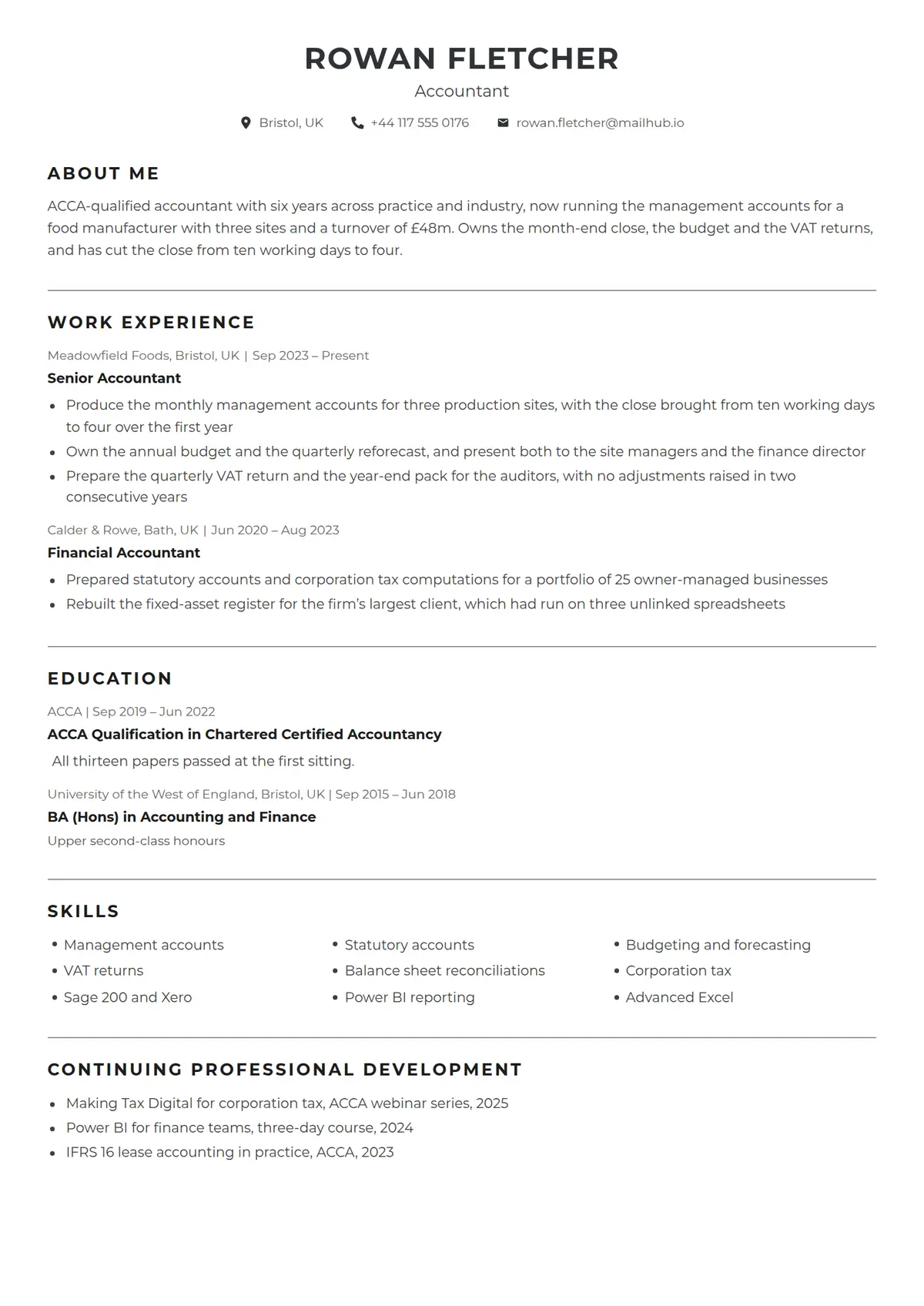
About the Tally template
Tally is the one-column resume that reads the way a ledger does, set on a white page with no photo: the name centred in bold capitals in the accent with the title in normal weight beneath it, then one centred line of contact details, each behind a small accent icon, and nothing closing the head. Every section, one the writer adds included, opens under the same bold spaced uppercase heading, and a thin grey rule runs the full width between one section and the next, so the page is divided by lines rather than by colour. Each entry opens on a small grey line reading the employer or school, the city and the dates divided by a bar, then the role or degree in bold, then its bullets, and the skills run three to a row as a bulleted grid. It suits an accountant, an administrator or anyone in a role where the reader wants the facts ruled off and nothing decorative in the way.
Read the accountant resume shown hereRowan Fletcher’s resume in full, with notes on why each part works.How it is built
- A white page with no photo, the name centred in bold capitals in the accent with the title in normal weight under it and one centred line of contact details behind small accent icons
- A thin grey rule the full width of the page between every section, with none above the first
- Every section opening under the same bold spaced uppercase heading, a section the writer adds included
- Each entry opening on a small grey line of employer or school, city and dates divided by a bar, with the role or degree in bold beneath it
- Skills three to a row as a bulleted grid under their heading
- Style
- Simple · Professional · Traditional
- Best for
- Finance · Business · Admin & Office
- Career stage
- Mid Level
- Layout
- One Column · Without Photo
- Photo
- No photo
Templates with a similar look
These share at least one style with Tally, so they are the closest alternatives if the proportions here are not right for your history.
- HingeA one-column resume hung on a thin yellow rail, with bold capital labels in a left margin and a yellow disc wherever a section rule crosses the rail
- StrataA one-column resume in full-width grey and white bands, each section headed by a blue icon square over its label in a left margin
- CypressA one-column serif resume with a round photo, the name in bold teal and teal headings centred between thin rules
- CanaryA thin yellow band over a white page, a name underlined line by line, and a square photo laid over a drawn frame
- RookA near-black column down the left edge carrying every heading in teal capitals, with a crossed monogram at its head
- PlacardA charcoal band across the head of the page with the name on a yellow plate, yellow icon discs and two ruled columns
Already have a resume?
Check it against the ATS before you reformat it. The score tells you what to fix, and this template is waiting when you are ready.
Check my resume