About the Ridge template
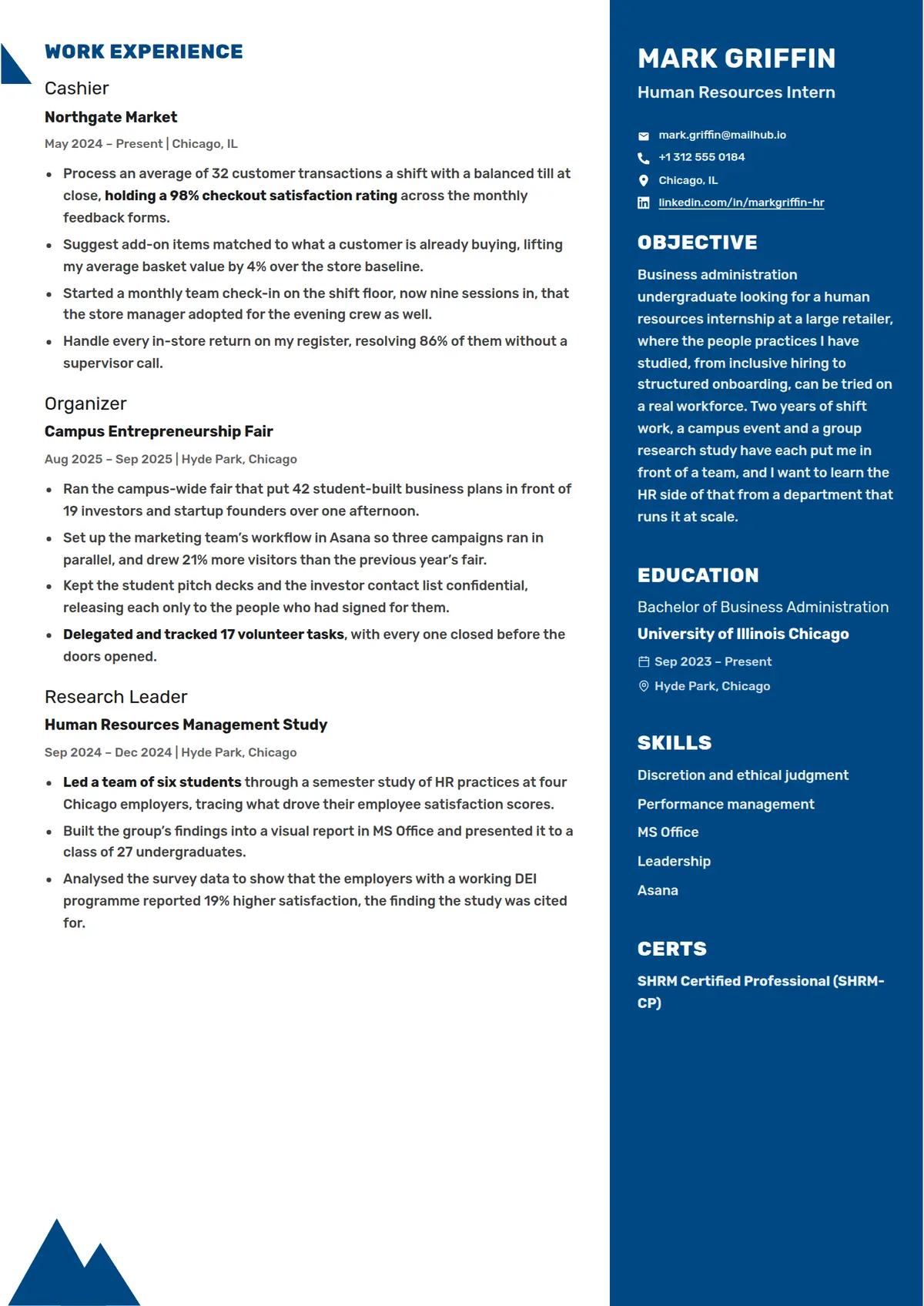
Ridge is a white page with a column of the accent down its right third, everything on it in white, and no photo. The column opens on the name in bold capitals with the job title in a plain line beneath, then the contact details beside small white icons with the email first and the profile links underlined, and the objective, the education, the skills and the certifications follow it down the column. Every section on either column, one the writer adds included, opens on its label alone in bold capitals with no rule or bar, in the accent on the white column and in white on the navy one. The white column carries the work history, and every role is marked from the page edge by a right-angled wedge of the accent whose slope runs down to the role, so the roles read as steps down the page, with two overlapping peaks of the accent standing at the foot of the column. A role is its title in a plain larger line over the employer in bold, then the dates and the city on one small line, then bullets; a degree is the award over the school in bold, then the years and the city each on a line after an icon. It suits a student or a first-job applicant who wants one strong colour and a page that reads top to bottom at a glance.
Read the human resources intern resume shown hereMark Griffin’s resume in full, with notes on why each part works.How it is built
- A column of the accent down the right third of the page, with the name in bold white capitals, the job title in a plain line and the contact details beside small white icons, the email first and the links underlined
- Every heading its label alone in bold capitals, with no rule or bar, in the accent on the white column and in white on the accent one, a section the writer adds included
- A right-angled wedge of the accent at the page edge beside every role, its square corner on the left margin and its slope running down to the role
- Two overlapping peaks of the accent standing at the foot of the white column
- A role as its title in a plain larger line over the employer in bold, then the dates and the city on one small line, then bullets
- A degree as the award in a plain line over the school in bold, then the years after a calendar icon and the city after a pin, one under the other
- Style
- Modern · Creative · Simple
- Best for
- Admin & Office · Business · Customer Service
- Career stage
- Entry Level
- Layout
- Two Column · Without Photo
- Photo
- No photo
Templates with a similar look
These share at least one style with Ridge, so they are the closest alternatives if the proportions here are not right for your history.
- HingeA one-column resume hung on a thin yellow rail, with bold capital labels in a left margin and a yellow disc wherever a section rule crosses the rail
- StrataA one-column resume in full-width grey and white bands, each section headed by a blue icon square over its label in a left margin
- FizzPink, pale blue and sand discs crowding the top right corner, and every heading a pale blue pill led by a pink icon square
- CypressA one-column serif resume with a round photo, the name in bold teal and teal headings centred between thin rules
- CloverThe name in two olive blocks and every heading opened by an olive square with a white plus, over two even columns
- CanaryA thin yellow band over a white page, a name underlined line by line, and a square photo laid over a drawn frame
Already have a resume?
Check it against the ATS before you reformat it. The score tells you what to fix, and this template is waiting when you are ready.
Check my resume