About the Margin template
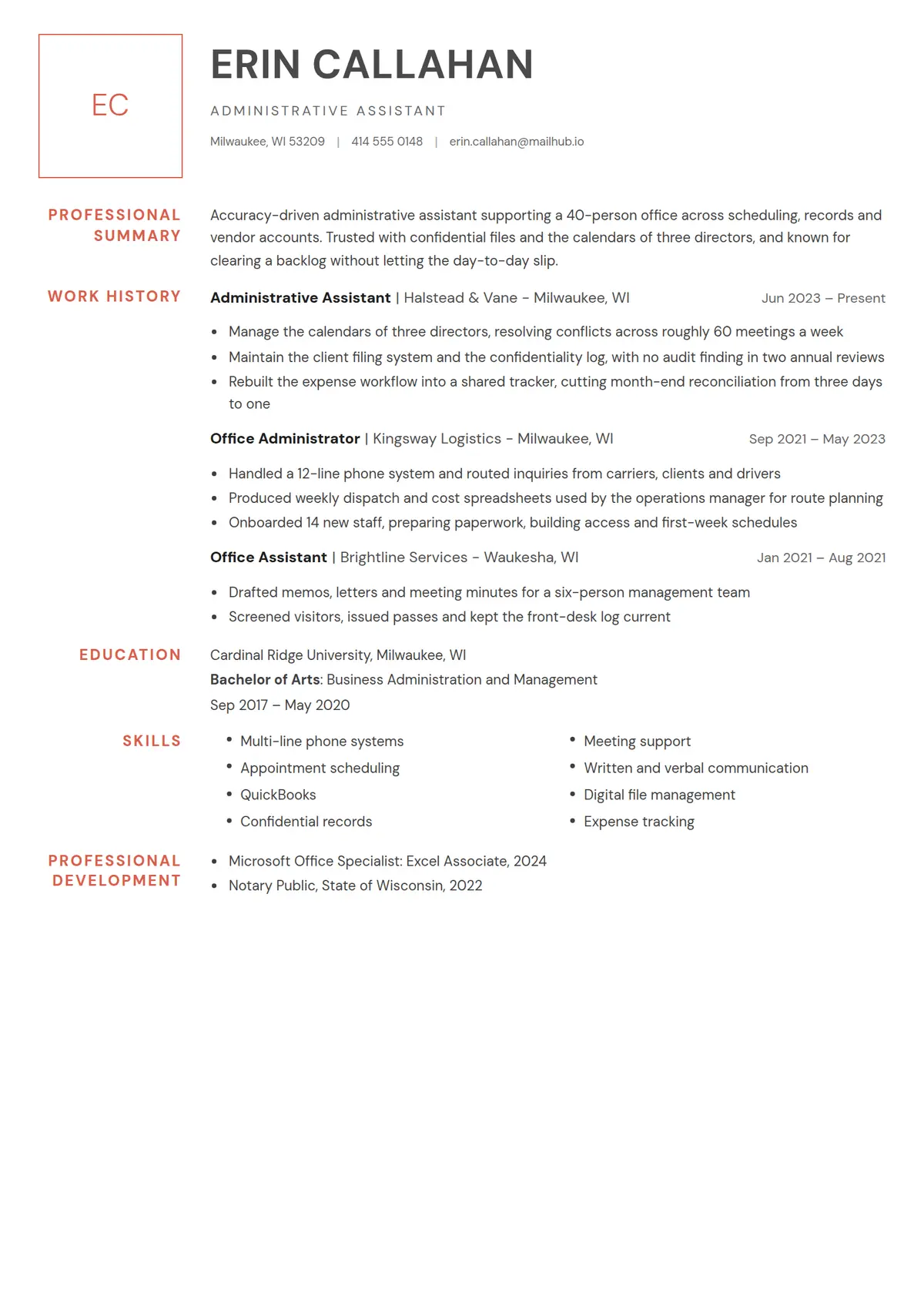
Margin puts its headings where a book puts its notes. A narrow rail runs down the left of the page carrying nothing but the initials, drawn in a thin accent square at the top, and the section headings beneath them in small accent capitals ranged right against the gutter. The content column beside the rail is left as one uninterrupted measure, opening with the name in large grey capitals over a contact line separated by pipes.
Read the administrative assistant resume shown hereErin Callahan’s resume in full, with notes on why each part works.How it is built
- The candidate initials in a thin accent square at the head of the rail
- Section headings in the left margin, right-aligned so a heading that wraps still reads as one block
- A pipe-separated contact line under the name instead of icons
- Job rows that read `Role | Employer, City` with the dates ranged right
- Education entries that open with the school and put the degree beneath it
- Skills in two bulleted columns across the content measure
- Style
- Simple · Elegant
- Best for
- Admin & Office · Customer Service · Business
- Career stage
- Mid Level
- Layout
- One Column · Without Photo
- Photo
- No photo
Templates with a similar look
These share at least one style with Margin, so they are the closest alternatives if the proportions here are not right for your history.
- CypressA one-column serif resume with a round photo, the name in bold teal and teal headings centred between thin rules
- TasselA slate teal bookmark with stacked initials hanging from the top edge, beside a bold capital name, over a page ruled into cells
- HazeA pale blue column washed light to deep with its top corner cut, a two-tone serif name and a raked blue bar running out to the page edge
- BeadInitials in a pale blue ring, blue margin headings and one grey rail threaded with an open ring at every section and role
- QuireA navy head band with a serif name, a round photo over its edge, navy heading blocks with a document icon and a navy strip at the foot
- BlushA pink band across the head with a square photo in its corner, one clean column below and every heading a small near-black tag
Already have a resume?
Check it against the ATS before you reformat it. The score tells you what to fix, and this template is waiting when you are ready.
Check my resume